
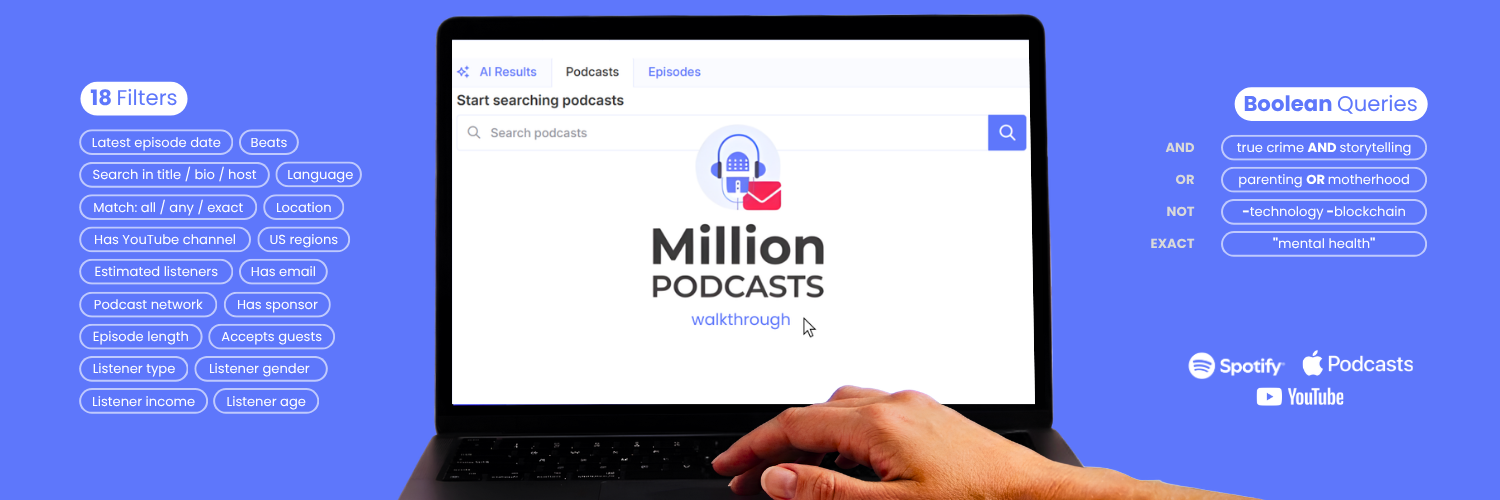
Type "tech" into MillionPodcasts and the database returns 56,900 podcasts and 248,100 episodes. That number is useless until you know how to cut it down. Knowing how to use MillionPodcasts well, and in what order to run its features, separates a wasted afternoon from a pitch-ready list. This guide covers every feature in that sequence, from the first search through to a CSV ready to drop into your outreach tool.
Brand new to the platform? Start with our overview of what MillionPodcasts is and who it is for, then come back here. This post assumes you have an account open in another tab. Every detail below reflects the current interface, not last year's version.
How do you use MillionPodcasts for podcast outreach? Search the 3M+ database and filter until only real targets remain. Then unlock verified host and producer emails and export the list to CSV or Excel. The free plan covers the first two steps with no card required.
1. What the 3M+ database contains and why filters matter
The audience you want to reach is already listening. Edison Research's Infinite Dial 2026 found that 58 percent of Americans age 12 and older listened to or watched a podcast in the past month, an all-time high. Reaching the right slice of that audience used to mean days of dead contact forms and stale media kits.
MillionPodcasts puts that work into one searchable database. It covers 3M+ podcasts across every category, each with profile data, audience analytics, and unlockable contact details. The platform handles sourcing and list building. You still write the pitch and send it from your own tool.
A directory tells you a show exists. A database tells you who runs it, who listens, and how to reach the person who books guests. That difference is the whole product. For a detailed breakdown, the podcast directory vs database guide covers it in full.
2. How do you search 3M+ podcasts?
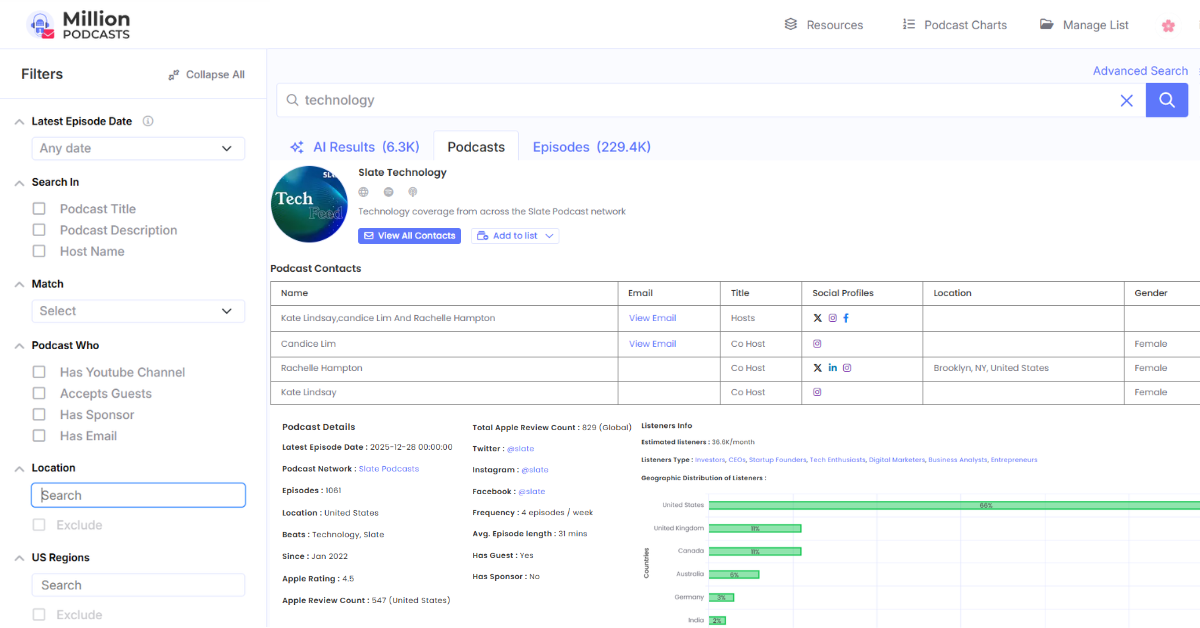
Every search returns three tabs. Each answers a different question. The counts for a single query make the scale clear. Here is what a search for "tech" returns across the three tabs, based on the platform as of June 2026.
| Tab | What "tech" returns | Best for |
|---|---|---|
| AI Results | About 3,000 shows ranked by semantic relevance to your phrasing | Plain-language briefs like "shows for B2B founders." Available on Pro plans and above. |
| Podcasts | 56,900 keyword-matched shows | Broad sweeps you narrow with the 17 filter dimensions in step 3. |
| Episodes | 248,100 individual episodes mentioning the term | Timing plays: a show that covered your topic last week is warmer than one that just carries the keyword in its title. |
Every result card shows the artwork, host names, Apple rating, review count, and location before you click. An Expand All control at the top of the filter sidebar opens every filter group at once. To browse by category before running a keyword search, the MillionPodcasts podcast directory organizes 11,400+ beats and categories for quick browsing. From there, the narrowing begins.
3. Which of the 17 filters to apply and in what order
The left sidebar stacks the filter system the pricing page counts as 17 dimensions. Most groups carry an Exclude checkbox, so every filter can subtract as well as add. The order you apply them matters as much as which ones you choose.
Apply Latest Episode Date first. It clears inactive shows from the full result set before anything else runs. Then Accepts Guests and Has Email together, because a show that books guests but has no working contact is as unreachable as one that never books guests at all. Apply Beats, audience demographics, and network filters after, narrowing a pool you already know is pitchable and reachable.
Filter for Accepts Guests plus Has Email plus Latest Episode Date within Last 30 Days before anything else. Those three checks alone remove the inactive shows, the solo formats, and the shows with no working contact in one pass. Everything after narrows a pool that can actually be pitched.
| Filter | Options | Why it matters |
|---|---|---|
| Latest Episode Date | Any date, This Week, This Month, This Year, Last Week, Last Month, Last 30 Days, Last 12 Months, Last 25 Months, Custom range | Confirms a show still publishes before you spend a pitch on it. Apply this first, every time. |
| Search In | Podcast Title, Podcast Description, Host Name | Aims the keyword at one field. Searching a name under Host Name finds every show that person hosts. |
| Match | All of these words, Any of these words, This exact word or phrase | Sets matching logic without opening Advanced Search. |
| Podcast Who | Has Youtube Channel, Accepts Guests, Has Sponsor, Has Email | Keeps only bookable, reachable, or monetized shows. 379.7K podcasts accept guests and 43.1K carry sponsors. Accepts Guests alone turns a topic list into an interview pipeline. |
| Location | Free search of any country, state, or city. Exclude supported. | Targets or removes whole geographies anywhere in the world. |
| US Regions | Searchable field of prebuilt US metro areas. Exclude supported. | Prebuilt metro targeting that ignores city borders. The dropdown opens with the San Francisco Bay Area, New York Metropolitan Area, Chicago, Dallas Fort Worth, Houston, and Miami metros, then scrolls past these. |
| Language | Free search across 180 supported languages. Exclude supported. | Runs international campaigns or strips a language from results entirely. |
| Listeners Type | Entrepreneur, CEO, Spiritual Seeker, Mental Health Advocate, Personal Development Advocate, Educator, and more (counts update live with the database) | Targets who listens, not just what the show covers. The live count beside each segment shows how many shows match. |
| Listener Gender | All, Predominantly Male, Predominantly Female | Matches audience gender skew to your buyer profile. |
| Listener Income | Low Income, Medium Income, High Income | Filters by audience spending power. Critical for sponsorship campaigns. |
| Listener Age | Gen Alpha (0 to 13), Gen Z (14 to 29), Millennials (30 to 45), Gen X (46 to 61), Baby Boomers (62 to 80), Silent Generation (81 to 98) | Reaches the generation that actually buys from you. |
| Estimated Monthly Listeners | Nano (up to 1,000), Micro (1,000 to 10,000), Mid-Tier (10,000 to 50,000), Macro (50,000 to 250,000), Mega (250,000 to 1,000,000) | Sizes reach to the campaign goal, from niche credibility to mass awareness. |
| Beats | Free search across 11,400+ podcast categories. Exclude supported. | Matches the editorial themes a show actually covers, whatever its title says. |
| Gender of Host | All, Male Only, Female Only | Filters by who hosts the show, useful for campaigns seeking specific representation. |
| Podcasts Network | Free search of 6K networks and producers with contact. Exclude supported. | Adds or removes an entire network or producer in one move. |
| Episode Length | Less than 10 minutes, 10 to 20, 20 to 40, 40 to 60, 60 to 90, Over 90 minutes | Matches the format to your pitch. An 8-minute news briefing and a 90-minute deep dive need different angles. |
The Episodes tab carries its own filter stack, including Podcast Monthly Listeners, which combines with these 16 sidebar groups to make up the 17 filter dimensions available across search surfaces. Once filtered, Sort By in the top right orders the survivors. Podcast results sort by Relevancy, Latest Episode Date, Number of Episodes, Apple Rating, or Apple Reviews. Sorting by Latest Episode Date floats the likeliest repliers to the top of your queue.
Location and US Regions: targeting by geography
Two separate filters handle geography. Location searches any country, state, or city worldwide. US Regions adds something most databases skip: prebuilt metro areas that span city borders, so a regional campaign pulls in the full commuter belt without typing individual cities.
Metro targeting changes the math on local campaigns. Filter finance shows to the New York Metropolitan Area, then add Accepts Guests and a Mid-Tier audience size. One minute of filtering produces a credible local authority list. Both geography filters support Exclude, so you can remove a specific market from a broader result set just as easily.
4. Boolean Advanced Search in four fields
The Advanced Search link in the top right opens a panel with four fields. Together they build a full Boolean query without memorizing operator syntax. Each field maps to one operator, and the panel prints a syntax hint under each box.
| Field | Operator | Syntax, from the panel hints |
|---|---|---|
| All these words | AND | The default. Type every term that must appear, like true crime storytelling. |
| This exact word or phrase | Exact match | Put the phrase in quotes, like "mental health". Loose neighbors drop out. |
| Any of these words | OR | Type OR between alternates, like parenting OR motherhood OR fatherhood. |
| None of these words | NOT | Put a minus sign before exclusions, like -technology -blockchain. |
A worked example for a blockchain founder fills three fields. All these words takes crypto founders. Any of these words takes DeFi OR NFT OR Web3, and none of these words takes -trading. The result is every show covering the crypto ecosystem for builders rather than day traders. Search runs the query, and Clear All resets the panel for the next campaign.
5. Episode search, alerts, and podcast charts
Three more research surfaces sit beyond the main podcast list. Coverage behind them spans Apple Podcasts, Spotify, and YouTube, including 180.9K Spotify Exclusive podcasts and 134.2K video podcasts on YouTube. Each earns a permanent place in a PR workflow.
Episode-level search and filters
The Episodes tab searches 62.1 million indexed episodes and carries its own filter stack:
- Latest Episode Date: the same recency presets as the podcast tab, from This Week to a custom range.
- Search In: Episode Title or Episode Description.
- Match: the same three logic modes as the podcast tab.
- Episode Language and Episode Length: both with an Exclude option.
- Podcast Location: filters episodes by the parent show's home market.
- Podcast Monthly Listeners: filters by the parent show's audience size.
The results header shows the live count, 248.1K for "tech" as of June 2026, next to a Create Alert button. Each episode card carries a Play button, the runtime, the publish date, and a snippet with your keyword highlighted. The parent show sits under each snippet, and sorting runs New to Old or Old to New. Clicking a result opens a side panel with the episode at top and the full show profile underneath. That panel includes Add to list, all the details fields, Listeners Info, and a Latest Episodes feed.
Create Alert: a standing monitor
Create Alert turns any episode query into a standing monitor. With 300K new episodes added in the last month, a saved alert for your brand, your category, or a rival topic catches fresh coverage without rerunning the search. For PR teams, that is newsjacking fuel on tap.
Podcast Charts and Rankings
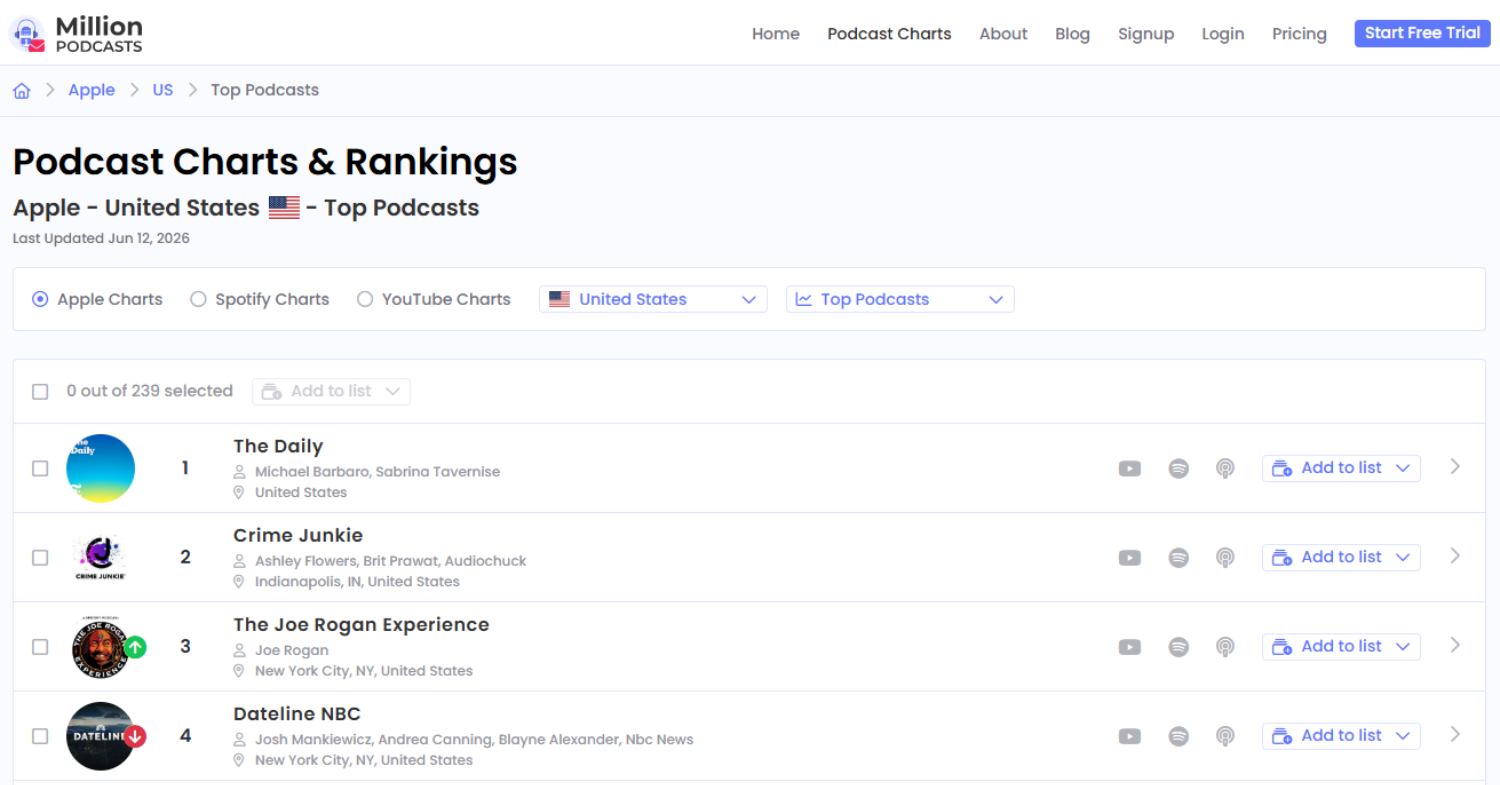
Podcast Charts sits in the top navigation. Three toggles switch the source between Apple Charts, Spotify Charts, and YouTube Charts. A country selector and a searchable category dropdown sit beside them. Categories cover Top Podcasts, Arts, Business, Comedy, Education, and more.
The page stamps its Last Updated date, and the US Apple Top Podcasts chart ranks 240 shows. Green and red arrows mark rank movement, platform icons show where each show lives, and every row carries Add to list. Checkboxes allow multi-select, so a whole chart segment can drop into a campaign list at once.
Watch the green arrows. A show climbing the charts is growing, hungry for content, and easier to book now than it will be in six months. Pitch the risers while the momentum is with you.
6. Verified contacts for hosts and producers
This is the feature the whole platform exists for. Open any show and the Podcast Contacts table lists every reachable person. Emails are manually researched, SMTP-checked, and GDPR-compliant before they ever appear, and the maintenance is ongoing: 19.5K podcast contacts were updated in the last 3 months. You pitch real inboxes instead of contact forms.
Each contact row carries six columns:
- Name: the person or entity, from co-hosts to the parent organization.
- Email: a View Email button that reveals the address and counts toward your plan's unlocks.
- Title: the contact's role, such as Co Host or Producer.
- Social Profiles: X and LinkedIn icons linking straight out.
- Location: the contact's city and country.
- Gender: a small but useful personalization signal.
A single show can list several co-hosts, its own inbox, and a parent organization contact. Host, producer, and booker contacts unlock on every paid plan. Choose the right contact for the right conversation: the host for a guest appearance pitch, the producer or booking agent for faster calendar access, the organization contact for a sponsorship or partnership discussion.
Contact unlocks are the metered resource on every plan, so spend them after filtering and after reading the profile, not before. Run the three-filter opening pass in step 3 and the profile check in step 7 first. Both are free. Unlock quotas run from 1,500 a year on Starter to unlimited on Business Plus. For the full contact verification process, the podcast contact guide covers how each email type is sourced and checked.
7. Reading podcast details before you pitch
Every result opens into a details panel that answers the pre-pitch questions in one screen. Here is the real profile for WSJ Tech News Briefing as captured on June 9, 2026. A daily show moves fast, so re-check the dated fields in the live panel before you pitch. The numbers below are a point-in-time snapshot.
| Field | WSJ Tech News Briefing (June 9, 2026 snapshot) | What it tells you |
|---|---|---|
| Latest Episode Date | June 9, 2026 | Published the same day as this snapshot. The show is active and pitches land on a working desk. |
| Since and Episodes | Apr 2020, 2,489 episodes | Six years of steady output. This is an institution, not an experiment. |
| Location | NY, United States | Anchors any geography play or location-based campaign check. |
| Frequency | 10 episodes a week | Read this alongside Avg. Episode Length before drawing any conclusions about guest access. |
| Avg. Episode Length | 8 minutes | A daily 8-minute news format. Combined with frequency, this signals a reporter-staffed briefing rather than an interview show. |
| Apple Rating | 4.3 | Audience satisfaction at a glance. Read with review count, not in isolation. |
| Apple Review Count | 1,559 United States, 2,157 global | Review volume signals real reach, split by market. |
| Estimated Listeners | 43K a month | Sizes the placement against your campaign goal before you invest a contact unlock. |
| Listeners Type | CEO, Investor, Tech Enthusiast | If those are your buyers, one well-placed appearance beats ten generic shows. |
| Geographic Distribution | US 73%, Canada 4%, Japan 4%, Taiwan 3%, UK 3%, India 3%, Germany 2%, Korea 2%, Australia 2% | A US launch fits this listener base. A campaign targeting India does not, whatever the topic match. |
| Social Media | @wsj on Twitter, Instagram, and Facebook | Handles for warming up before the pitch lands. |
| Has Guest and Has Sponsor | Guest: Yes. Sponsor: No | Has Guest reads Yes. Cross-check with Frequency (10 eps/week) and Avg. Episode Length (8 min) before pitching. A daily 8-minute news format books WSJ reporters, not externally pitched guests. See the paragraph below for how to read this correctly. |
One field always needs context from two others: Has Guest. A show flagged Yes still needs Frequency and Avg. Episode Length to confirm the format. Interview-format shows run one to two episodes a week and average 30 minutes or above. News briefings publish daily at under 15 minutes each. Both can read Has Guest: Yes. Only one accepts an externally pitched guest in the traditional sense. Check the format before you unlock anything.
The panel also lists the Podcast Network and the show's Beats. Listeners Info goes further on many shows, breaking listener age, income, and gender into percentage splits. Reference a recent episode, match its beat, and speak to its actual audience. The pitch reads like research instead of spray and pray.
Check the date, the format, the audience, and the guest flag before every single send. Frequency and Avg. Episode Length are the two fields most often skipped. Skipping either is how good pitches land in the wrong inbox, or in an inbox nobody checks on a show that would never run a guest anyway.
8. Manage lists and export your outreach database
An Add to list button sits on every result, every details panel, and every chart row. Checkboxes support multi-select, and a master checkbox grabs the whole page. Lists are how a search session becomes an outreach database you can run a campaign from.
The Manage List screen in the top navigation is the database's control room. Every column on it earns its place.
| Column | What it does |
|---|---|
| List Name | The label you set at creation. Clicking it opens the list. |
| List Type | The kind of list, such as Podcast list. |
| List Size | A live count of saved shows. Lists hold up to 10,000 podcasts. |
| Last updated | The date the list last changed. Your freshness check at a glance. |
| Preview | Opens the list for a quality check before export. |
| Export | Queues a CSV or Excel file with your chosen columns. |
| Download Link | Appears once the export file is ready. |
| Actions | A menu of list-level controls including rename and delete. |
Exports come in CSV or Excel with customizable columns, so you pull only the fields your CRM or mail merge tool needs.
Database management habits that keep lists pitch-ready
- Name lists by campaign: "Q3 Product Launch" beats "Good Shows." The Last Updated column then tells you at a glance which campaign data is going stale.
- Preview before every export: catch duplicates and off-target shows before they reach your CRM. Cleaning them there is much harder.
- Re-check freshness quarterly: rerun the Latest Episode Date filter on older lists. Shows go quiet, and a stale list quietly drags your reply rate down.
- Export only the columns you mail with: a lean file beats a 30-column dump nobody opens.
From export onward the work moves to your own tools: personalization, sending, follow ups, and tracking. For the full campaign side of that workflow, the podcast outreach list guide covers it step by step.
Which plan fits your outreach volume?
Pricing runs across five tiers. The live comparison sits on the Plans and Pricing page. Here is every line of it, feature by feature.
| Feature | Free $0 | Starter $12 | Pro $30 | Business $60 | Business Plus $150 |
|---|---|---|---|---|---|
| Database access, 3M+ podcasts | Included | Included | Included | Included | Included |
| AI Search, natural language queries | Locked | Not included | Included | Included | Included |
| Searches per month | 100 | 100 | 250 | 500 | Unlimited |
| Results per query | 250, or 5 with any filter | 250 | 1,000 | 5,000 | Unlimited |
| Verified host emails | Locked | 1,500 a year | 12,000 a year | 60,000 a year | Unlimited |
| Producer and booker contacts | Locked | Included | Included | Included | Included |
| Twitter, LinkedIn, Instagram profiles | Locked | Included | Included | Included | Included |
| Lists you can create | 3 | 3 | 10 | 50 | Unlimited |
| CSV and Excel exports | Locked | 1,500 a year | 12,000 a year | 60,000 a year | Unlimited |
| Customizable export columns | Not included | Included | Included | Included | Included |
| Core filters: date, language, beat, network, length | Included | Included | Included | Included | Included |
| Location and US Region filters | Locked | Included | Included | Included | Included |
| Listener demographics: type, gender, income, age | Locked | Included | Included | Included | Included |
| Geographic distribution of listeners | Locked | Included | Included | Included | Included |
| Email support | Standard | Standard | Priority | Priority | Priority |
| Concierge research and list building | Not included | Not included | Not included | Included | Included |
| Slack and Telegram priority channel | Not included | Not included | Not included | Included | Included |
Prices shown are per month, billed yearly. Annual billing saves up to 40 percent and locks the rate. Monthly billing is available on every tier. Business Plus lists at $150 a month billed yearly, marked down from $416. Payments run through Stripe, cancellation takes one click in account settings, and tier switches are prorated.
Concierge service on Business and Business Plus
| Service | What the team does | Turnaround |
|---|---|---|
| Contact research on demand | Flag any show with missing or stale contacts. Researchers locate the host, producer, or booker email. | Same week on most requests |
| Custom list building | Brief the team once on beat, geography, audience size, recency, and format. The finished list arrives in your inbox. | By end of week |
| Slack and Telegram priority channel | Direct access to the founding team for questions, fixes, and feature requests. | Usually within hours |
Solo founders pitching a handful of shows a month fit Starter. Consultants and in-house marketers running steady campaigns fit Pro, mostly for AI Search and the 12,000 unlocks. Agencies juggling clients fit Business, where the concierge team handles missing contacts and briefed list builds. Heavy multi-client agencies graduate to Business Plus when quotas start binding.
Build the list this guide runs on
Search 3M+ podcasts, filter to the shows that accept guests in your niche, and unlock verified host and producer emails. Export the finished list to CSV or Excel and run your pitches from your own CRM or mail merge tool. The free plan needs no card.
Start free, no card →The smallest next action takes under 30 minutes. Open the free plan and run one search for your niche. Apply Accepts Guests plus Latest Episode Date set to Last 30 Days. Then save ten shows that pass the profile check in step 7 to a named list. You will know by the end of that session whether the database fits your workflow and your campaign.
9. Common questions about using MillionPodcasts
Is MillionPodcasts legit?
Yes. MillionPodcasts is a podcast database used by PR professionals and marketers to find shows and verified contacts. It covers 3M+ podcasts, runs a free plan with no card required, and bills through Stripe. You can search the database and open show profiles without paying. Verified contacts, exports, and premium filters start on paid plans from $12 a month billed yearly.
How many podcasts does MillionPodcasts have?
The database covers 3M+ podcasts and 62.1 million episodes across every category, with 1.2 million shows carrying verified contacts. You can search them with 17 filters, including location, language, beat, network, audience size, and listener demographics.
Does MillionPodcasts send outreach emails for you?
No. MillionPodcasts handles the sourcing step: search, filter, unlock verified contacts, and export. You send pitches and follow ups from your own email tool, CRM, or mail merge using the exported list.
What does the MillionPodcasts free plan include?
The free plan includes 100 searches a month, 250 results per query, 3 lists, and the core filters. Apply any filter and results cap at 5 per query. Contact unlocks, exports, location filters, and listener demographics open up on paid plans starting at 12 dollars a month billed yearly.
Can I export podcast lists to CSV or Excel?
Yes. Paid plans export lists in CSV or Excel with customizable columns. Starter includes 1,500 exports a year, Pro includes 12,000, Business includes 60,000, and Business Plus is unlimited.
How do I get help inside MillionPodcasts?
Use the in-app Help widget in the bottom corner. Collections cover Explore Features, Searching for Podcasts, Account Settings, Account and Billing, Subscription and Payment, Getting Started, and Accessing Product and Account Support. A Messages tab opens direct chat with support.
References
Edison Research at SSRS. (March 2026). The Infinite Dial 2026. https://www.edisonresearch.com/the-infinite-dial-2026/ MillionPodcasts. (2026). Plans and Pricing. https://www.millionpodcasts.com/pricing MillionPodcasts. (2026). Podcast Database Search Interface. https://www.millionpodcasts.com/