
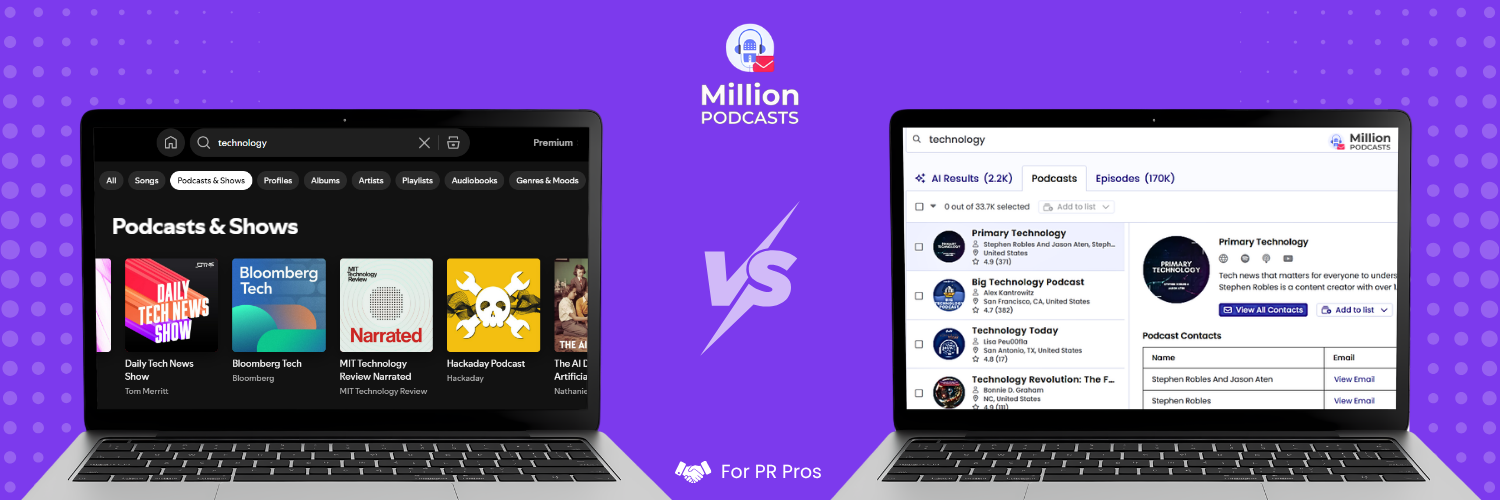
Most PR teams and marketers searching for podcast placements open Apple Podcasts or Spotify first. Both are podcast directories, designed to help listeners find shows. They were not built to filter shows by audience size, find verified booking contacts, or tell you which podcasts actively accept guests. Using the wrong tool at the start of a campaign costs hours that do not come back.
A podcast database and a podcast directory look nearly identical on the surface. Both index shows and return results from a search bar. The difference appears the moment you need to act on a result. Building a podcast outreach list with a directory leaves you with show names and no way to filter or reach anyone.
This guide draws the structural line between both tool categories. It maps where each tool fits in a PR or marketing workflow and what each cannot do. It also covers how to run them in sequence without repeating steps. By the end, you can act on either tool without a second tab open.
What is a podcast database? A podcast database is a research tool for filtering and contacting podcast shows at scale. Unlike a podcast directory, a database adds verified booking contacts, audience estimates, and outreach filters that no directory carries.
1. What is a podcast database?
A podcast database is a research and outreach tool, not a listening platform. It starts from the same raw RSS feed data that any podcast directory ingests. Then it enriches that data to serve a different kind of user: the researcher, not the listener. That researcher needs audience estimates, verified contacts, and guest history, not episode descriptions.
The filters inside a podcast database reflect researcher priorities. You can narrow results by estimated monthly listeners, derived from multiple signals rather than self-reported figures. You can identify shows that actively book interview guests, a field no listener-facing platform carries. You can also sort by publishing frequency, geographic location, audience income level, and dozens of other dimensions your pitch list depends on.
MillionPodcasts searches more than 3M podcasts across 17 filter dimensions, including audience size, listener demographics, and guest acceptance. It returns shows alongside verified host, producer, and booker contacts. The workflow runs in four steps: search, filter, unlock contacts, and export your list to whatever outreach tool you use.
When evaluating any podcast research tool, ask one question before you pay for anything: was this built for listeners or for researchers? A listener-facing platform cannot produce a filtered pitch list regardless of how advanced its search bar looks. The underlying data architecture determines what is and is not possible.
2. What is a podcast directory built to do?
A podcast directory is distribution infrastructure. Podcasters submit an RSS feed to platforms like Apple Podcasts, Spotify, and Amazon Music. Each platform ingests that feed, indexes the metadata, and makes the show browsable for listeners searching for new content to subscribe to.
Every architectural decision in a directory serves that listener-facing purpose. Category structures help casual browsers navigate by topic. Search returns show titles and descriptions because those are the signals a listener uses when deciding whether to subscribe. Episode lists refresh automatically when RSS feeds update, because automation serves the listener with no action required.
What the architecture does not contain is anything a listener would not need. There is no verified booking email field, no filter for shows that accept guest pitches, and no independently sourced listener estimate. Directories were not built to answer those questions. Their original users were never asking them.
Apple Podcasts categories are more useful for early niche research than the search bar. Navigate directly to a subcategory like Business, then Entrepreneurship, and browse the ranked list rather than typing keywords. Rankings update daily, reflecting actual listener engagement rather than how well a podcaster wrote their show description.
3. Why a directory's architecture limits research
The limitations of a podcast directory for outreach research are structural, not features waiting to be added. A directory is essentially a mirror of whatever the podcaster submitted during RSS feed setup. That submission includes a show title, a category, a description, and an email address. None of those fields serve a researcher building a pitch list.
The RSS email field is the clearest example of this gap. The address a podcaster enters at launch is almost always a general show inbox created for the occasion. It is rarely monitored for guest inquiries and often sits in the same folder as promotional email. Podcast databases that invest in contact research replace that address with a manually sourced, SMTP-verified producer or booker email.
Audience size is a second structural absence. Directories do not store estimated monthly listener counts because listeners have no use for that data. A researcher building a pitch list does. Getting verified estimates requires a database that derives them from multiple external signals, not the podcast's own claims.
If a tool shows audience numbers labeled self-reported, treat them as unverified. Self-reported listener figures have no mechanism for accuracy checks. A reliable podcast database derives listener estimates from multiple external data points and is transparent about how each figure is built.
4. Podcast directory vs podcast database: compared
Both tool categories index podcast shows, return titles and descriptions, and offer keyword search. That surface similarity is where the confusion comes from. A directory search looks enough like a database search to mistake one for the other. The wall appears the moment you need to act on a result.
| Podcast Directory | Podcast Database | |
|---|---|---|
| Also called | Distribution platform, discovery platform | Podcast research tool, outreach database |
| Built for | Listeners finding content | Researchers identifying targets |
| Data source | Self-reported RSS metadata | RSS plus independent enrichment |
| Contact data | Generic RSS email, unverified | Verified producer and booking contacts |
| Audience size | Not available or unverified | Estimated from multiple signals |
| Guest-friendly filter | Not available | Available on leading platforms |
| Category depth | Broad (Business, Technology) | Deep niche (SaaS, fintech, B2B) |
| Search depth | Title and description only | Transcripts, guest names, episode data |
| Outreach tools | None | List building, export, campaign tracking |
| Listener audio access | Full, immediate | Not typical |
The listener audio access row is the one that earns a directory a genuine place in your workflow. Immediate, full-episode streaming is something a podcast database does not typically offer. That capability has a specific use in the pitch preparation stage of a campaign.
Two specific capabilities separate a podcast database from a directory. The first is a verified contact field that goes beyond the generic RSS submission email. The second is a filter for shows that actively accept guests. If neither exists, the tool belongs in a listener's workflow, not a researcher's.
5. When a podcast directory earns its place
A podcast directory handles four specific tasks inside an outreach campaign better than any database can. Each belongs after your filtered list is already built, not before.
Confirm a show is still publishing before you pitch
Podcast database freshness data updates on a schedule, and that schedule creates lag. Before sending any pitch, open the show directly in Apple Podcasts or Spotify and check the last published episode date manually. A show that appeared active in a database snapshot this week might have gone quiet since. This check takes under a minute and prevents pitching a dormant show.
Read listener reviews before you commit
Apple Podcasts review scores are the most direct signal of what a real audience thinks about a show. A show with 4.7 stars across 300 reviews signals genuine listener loyalty. A show averaging 3.1 stars with reviews citing ad overload or publishing gaps raises questions before you commit. Podcast databases rarely surface this data in usable form.
Audit the episode archive for topic overlap
Before pitching a specific angle, check whether the show covered it recently. Open the episode list in Apple Podcasts or Spotify and use the in-app search to rule out recently covered topics. Hosts notice when a pitch covers ground they already gave significant airtime to. This check takes two to three minutes per show.
Prepare each pitch by listening to recent episodes
Before writing, listen to the most recent episode of each priority target. Note the host's interview style, the depth of their questions, and themes you can reference specifically. One reference to a real episode or a question the host recently asked tells them you did the work. That signal has a disproportionate effect on response rates relative to the time it requires.
Before setting your database filters, check FeedSpot's curated podcast rankings to see which shows lead a niche by listener count. That gives you the top names upfront. Search for each in your database to unlock contacts and confirm they accept guests.
6. What a podcast directory cannot do for outreach
Four specific workflow tasks break down entirely when a podcast directory is the only tool in use. These are not edge cases. They appear in every standard podcast outreach campaign.
A podcast directory cannot do any of the following:
- Filter shows by estimated monthly listener count
- Identify which shows actively book interview guests
- Provide verified producer or booking contacts beyond the generic RSS email
- Export a qualified pitch list with contact data attached
- Search episode transcripts by topic or guest name to qualify shows at scale
Building a filtered list from campaign criteria
For a campaign requiring US business podcasts with 10,000 to 50,000 monthly listeners that actively book guests, no directory builds that list. The filters do not exist on any listener platform. A podcast database narrows from millions of indexed shows to that qualified shortlist in a single filtered search.
Here is what that narrowing looks like with real numbers. We ran that exact brief inside the MillionPodcasts database in August 2026. One filter went on at a time, and we logged the result count at each step.
| Filter applied | Shows remaining |
|---|---|
| US shows that published in the last 12 months | 97.7K |
| Plus the business beat | 4.6K |
| Plus 10,000 to 50,000 estimated monthly listeners | 316 |
| Plus accepts guests | 267 |
| Plus has an email on file | 263 |
Five filters take 97.7K shows down to 263. Each of those 263 shows is active, US based, and in the business beat. Each one lands in the audience band the brief called for. Each one accepts guests and has an email on file, so the list is ready to work through.
Notice where the drop happens. The audience size filter alone cuts 4.6K shows to 316, and that is the single filter no listener platform offers. A directory can show you every business podcast in the US. It cannot tell you which 263 of them are worth your week.
Finding verified contact information
The email field in a podcast's RSS feed is almost always a general inbox created during initial show setup. Sending a pitch to that address reduces the probability of reaching someone with actual booking authority. Verified producer and booker emails come from databases that invest in contact research and ongoing deliverability checking. This matters equally for sponsored podcast placements, where a wrong contact wastes the budget as much as a wrong show.
Filtering by audience characteristics
"This show covers finance" is not sufficient for a campaign where the audience distinction matters. Podcast databases that surface audience demographics, geographic concentration, and listener income levels let you filter those characteristics before the list is built. That specificity saves qualification time in the research phase. A mismatch discovered after pitching is far more expensive than one avoided upfront.
Tracking which shows have covered competitor territory
Some podcast databases index guest history at the episode level, surfacing shows where executives from competing brands have appeared. Both pitch angle and show selection benefit from that intelligence. No listener-facing directory makes guest appearance history searchable.
Verified booking contacts are the most time-intensive data to collect manually. Sending a pitch to the generic RSS inbox means it lands in an email nobody monitors for guest inquiries. A podcast database that maintains SMTP-checked, deliverability-verified contacts solves the most common reason outreach pitches fail to reach the right person.
A podcast directory tells you a show exists. A podcast database tells you whether that show is worth pitching, who to contact, and what angle to lead with. Both tools are useful in a campaign. The wasted hours come from using either one where the other belongs.
Build the list this guide runs on
MillionPodcasts searches more than 3M podcasts across 17 filter dimensions. Apply your niche, audience size range, publishing frequency, and guest-acceptance filter, then unlock verified host, producer, and booker contacts. Export your qualified pitch list to CSV or Excel and take it into whatever outreach tool you use.
Search podcasts free →7. How to use both tools without duplicating work
The efficient workflow uses both tool types in a defined sequence, each in its correct position. Wasted effort comes from using both without a defined handoff point between them.
Step 1. Build and filter with a podcast database first
Apply every campaign filter first: niche, audience size range, geography, publishing frequency, and whether a show accepts guests. Export the results with contact data included. This export becomes your working list for the campaign. Every subsequent step runs against this list, not against a fresh search.
Step 2. Verify priority shows in a podcast directory
Take the top 20 to 30 shows from your list and open each in Apple Podcasts or Spotify. Confirm the last episode date is recent and read a handful of listener reviews. Scan the episode archive for topic overlap with your pitch angle. Two to three minutes per show surfaces issues a database update cycle may have missed.
Step 3. Use a directory to prepare each pitch
Listen to the most recent episode of each priority target before writing. Note the host's interview style and any specific themes worth referencing in your pitch. One reference to a real episode or question the host asked tells them you actually listened. That detail shifts response rates more than any other single variable in a cold pitch.
Step 4. Log outcomes in the podcast database
If your podcast research tool includes list management and status tracking, use it for the full campaign record. Record pitch dates, follow-up notes, and outcomes where you built the list. Context is easy to lose when a campaign spans several weeks or pauses between outreach rounds. The full workflow stays in one place.
If you use Apple Podcasts or Spotify for everything from research to contact lookup, the fix is not a better search technique. Add a podcast database to the front of your workflow. Run your filter set, export the list with verified contacts, then use the directory for verification and pitch prep. That sequence keeps both tools in their correct roles.
The handoff between a podcast database and a podcast directory happens once: after you export your filtered list. Everything before export belongs in the database. Everything that validates and prepares a specific pitch belongs in the directory. Keeping this sequence prevents the most common source of wasted research hours in podcast outreach campaigns.
8. Frequently asked questions
What is a podcast database?
A podcast database is a research and outreach tool, not a listening platform. It enriches podcast RSS data with verified contacts, audience size estimates, and outreach filters that no directory carries. PR professionals, marketers, and agencies use it to filter millions of shows by niche, location, and frequency. The output is a qualified list with verified booking contacts attached, ready to export.
What is the difference between a podcast database and a podcast directory?
A podcast directory organizes shows for listeners to discover and subscribe to, using RSS feed metadata. A podcast database enriches that raw data with verified contacts, audience estimates, and outreach filters that no listener platform carries. The directory answers whether a show exists. The database answers whether it is worth pitching and how to reach it.
What is a podcast contact database?
A podcast contact database is a type of podcast database that stores verified contact information for podcast hosts, producers, and booking managers. Rather than the generic RSS email, a contact database maintains manually researched, SMTP-verified addresses for the people who actually book guests.
What are podcast directories used for?
Podcast directories like Apple Podcasts and Spotify are used by listeners to find, subscribe to, and stream shows by category or keyword. In an outreach workflow, they serve a narrower secondary role. Use them to confirm a show is still publishing, read listener reviews to assess quality, and audit episode archives for topic overlap. They are not built for building pitch lists or finding booking contacts.
Can I use Apple Podcasts or Spotify for podcast outreach research?
Apple Podcasts and Spotify are useful for verification tasks, not sourcing tasks. Use them to confirm a show is still active, read listener reviews, and check episode history for topic overlap. They cannot filter shows by audience size, identify which shows accept guests, or provide verified booking contacts. Those capabilities require a dedicated podcast database.
References
Apple. (May 2026). Apple Podcasts Connect. https://podcastsconnect.apple.com/ MillionPodcasts. (June 2026). Our Database. https://www.millionpodcasts.com/ MillionPodcasts. (August 2026). Podcast search filters and result counts. https://www.millionpodcasts.com/