

MillionPodcasts is a podcast database that helps PR teams, brands and podcasters find the right shows and reach the people who book them. It covers 3.1 million podcasts, and 85K of them published in the last 30 days, accept guests and have a contact ready to pitch, as of November 2, 2026.
Who Uses MillionPodcasts?
PR teams, brands and podcasters use it, and one account covers all three jobs.
PR Teams Book Clients as Podcast Guests
Publicists and in-house PR teams find active shows in a client's field that accept guests, then pitch the host or the booker, the person who schedules a show's guests. When a show has a booker, their email sits on the profile next to the host's.
Brands Find Shows Worth Sponsoring
Marketers look for shows whose listeners match their customers by age, income and listener type, then check which of those shows already run ads. Each profile's Sponsors List names past sponsors, the episodes they appeared in and their industry.
Podcasters Find Guests and Partner Shows
Hosts search individual episodes to find people who recently spoke on their topic, and each profile's Guests List shows who has appeared, with their profession and episode. Shows with a similar audience make natural partners for trading guest appearances.
What's Inside the Database?
Shows from Apple Podcasts, Spotify and YouTube, each with its episodes, contacts and audience data in one record.
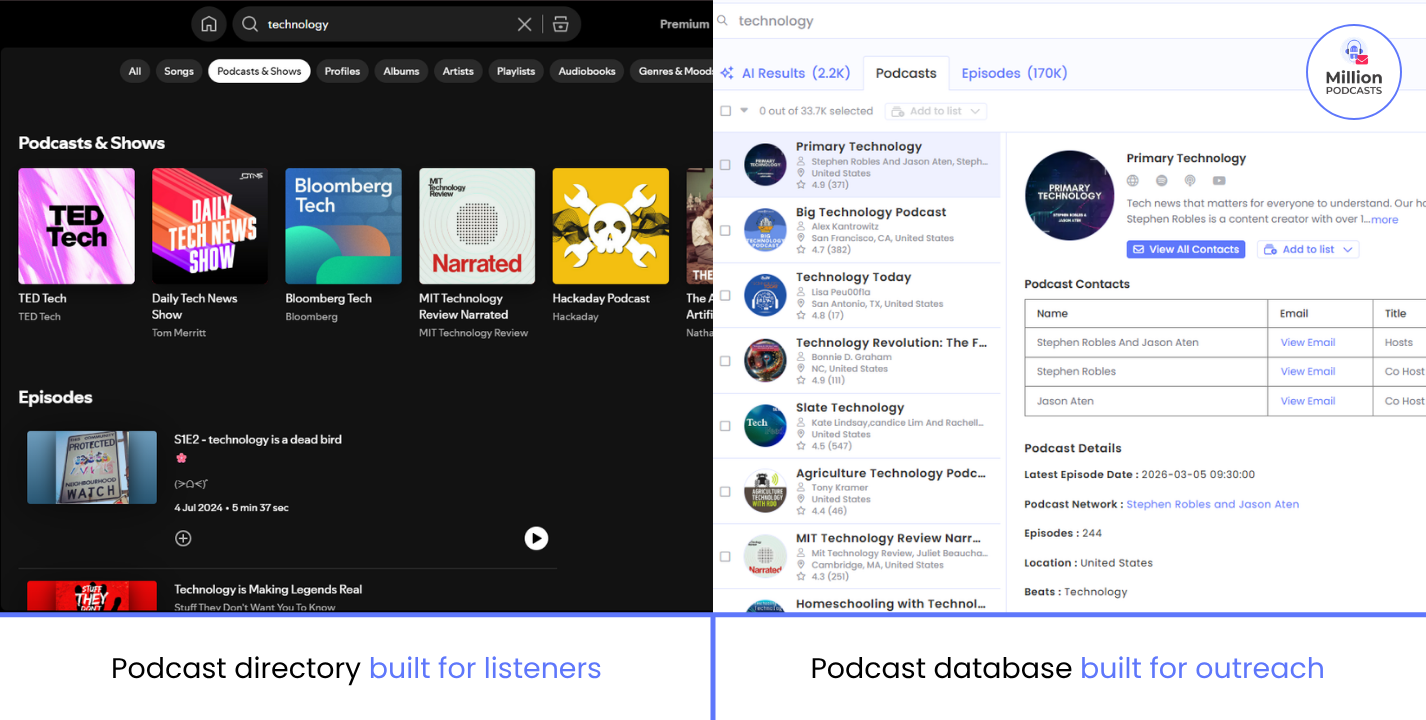
3.1 Million Podcasts and 62.1 Million Episodes Are Searchable
| What our database holds | Count |
|---|---|
| Podcasts | 3.1M |
| Episodes | 62.1M |
| Podcasts with at least one contact | 1.2M |
| Podcast networks and producers with a direct contact | 6.5K |
| Podcasts that accept guests | 287.6K |
| Podcasts with sponsors | 43.6K |
| Podcasts only on Spotify | 179.6K |
| Video podcasts on YouTube | 141.8K |
| Languages | 180 |
| Categories | 11.4K |
| Episodes added in the last month | 300K |
| Podcasts added in the last 3 months | 340.5K |
Source: our podcast database, counts as of October 27, 2026.
Contacts cover 1.2 million shows, and the index keeps growing, with 300K episodes added in the month to October 27, 2026.
85K Active Shows Take Guests and List an Email
Of the 250.1K shows that published in the last 30 days, 109.2K accept guests, and 85K of those list an email, which is 78%.
Shows ready to pitch, November 2, 2026
How Do Search and Filters Work?
Every search starts from the bar at the top of the page, and the filters sit in a sidebar on the left.
Three Tabs Search Shows, Episodes and Meaning
The Podcasts tab returns whole shows. The Episodes tab searches individual episodes, so you find hosts who covered your topic recently even when it isn't their usual subject, and its Create Alert button turns that search into a standing alert for new matching episodes.
AI Results matches by meaning rather than exact words. For example, a search for "first-time founders" can surface shows that call themselves "early-stage startups." It comes with Pro plans and above, where our pricing page lists it as AI Search.
Keywords Can Be Broad, Exact or Excluded
- Choose where a keyword can match: Search In limits it to the Podcast Title, Podcast Description or Host Name.
- Choose how words combine: Match offers All of these words, Any of these words, or This exact word or phrase.
- Include or exclude specific words: type a single word for a broad match or put a phrase in quotes for an exact one. Exclude keyword removes every show that mentions it.
- Reorder the results: Sort By ranks shows by Relevancy, Latest Episode Date, No. of Episodes, Apple Rating or Apple Reviews.
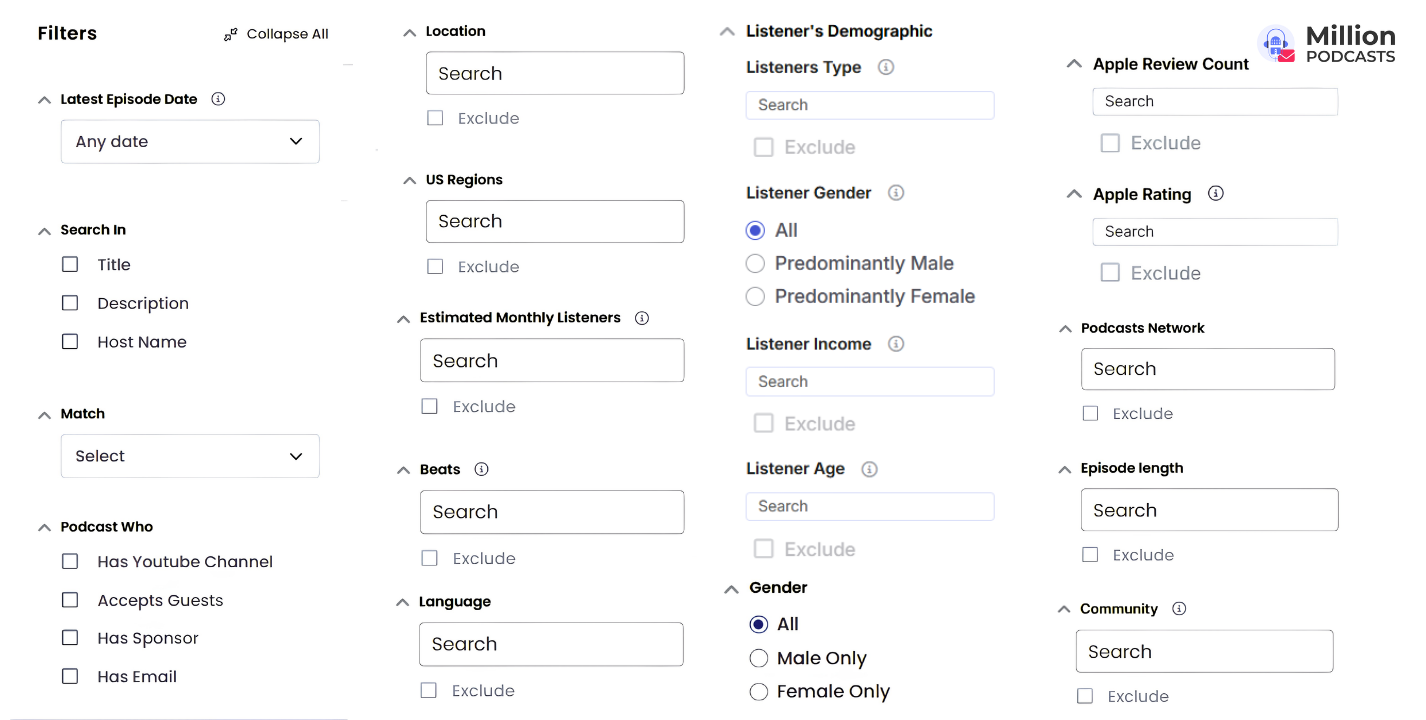
Filters Narrow Results by Activity, Reach, Audience and Format
Start with Latest Episode Date set to Last 30 Days, so every show you see still publishes, then add the filters your brief needs.
| Filter | What it tells you | Options |
|---|---|---|
| Latest Episode Date | Whether the show still publishes | Any date, This Week, This Month, This Year, Last Week, Last Month, Last 30 Days, Last 12 Months, Last 25 Months or a custom range |
| Accepts Guests (under Podcast Who) | Whether the show books outside guests | Tick to keep only these shows |
| Has Sponsor (under Podcast Who) | Whether the show already runs ads | Tick to keep only these shows |
| Has Email (under Podcast Who) | Whether a contact email is on file | Tick to keep only these shows |
| Has Youtube Channel (under Podcast Who) | Whether the show has a video version | Tick to keep only these shows |
| Podcast Age | How long the show has run | Under 1 year (New), 1 to 3 years (Emerging), 3 to 5 years (Established), 5 to 10 years (Veteran), 10+ years (Legacy) |
| Total Episodes | How much the show has published | Under 10, 10 to 49, 50 to 99, 100 to 499, 500+ |
| Estimated Monthly Listeners | How big the audience is | Up to 1,000 (Nano), 1,000 to 10,000 (Micro), 10,000 to 50,000 (Mid-Tier), 50,000 to 250,000 (Macro), 250,000 to 1,000,000 (Mega), 1,000,000+ (Celebrity) |
| Apple Rating | How listeners rate the show | 4.8+, 4.5+, 4.0+, 3.5+, 3.0+, Below 3.0 |
| Apple Review Count | How many people reviewed it | Up to 10, 10 to 50, 50 to 250, 250 to 1,000, 1,000 to 10,000, 10,000+ |
| Listeners Type | Who the listeners are | Searchable segments, such as Entrepreneur, Investor and True Crime Enthusiast, and many more |
| Listener Age | Which generation listens | Gen Alpha (0 to 13), Gen Z (14 to 29), Millennials (30 to 45), Gen X (46 to 61), Baby Boomers (62 to 80), Silent Generation (81 to 98) |
| Listener Income | The audience's income level | Low Income, Medium Income, High Income |
| Listener Gender | The audience's gender balance | All, Predominantly Male, Predominantly Female |
| Location | Where the show is based | World Regions, Country, States, Cities, US Metro Areas and Region |
| US Regions | Which US metro area the show is in | Searchable prebuilt metro areas |
| Language | What language the show is in | Any of 180 languages |
| Beats | What topics the show covers | Any topic you type |
| Community | Which community the show serves | Black or African American, Hispanic or Latino, Jewish, Indigenous or Native, Asian American |
| Host Gender | Who hosts the show | All, Male, Female |
| Podcasts Network | Which network the show belongs to | Any network you type |
| Episode length | How long episodes run | Less than 10 minutes, 10 to 20, 20 to 40, 40 to 60, 60 to 90, Over 90 minutes |
The free plan includes the core filters, such as date, language, beat, network and episode length. Location, US Regions and the listener filters come with paid plans. Our complete guide to every filter shows each one in use.
What Does a Show Profile Tell You?
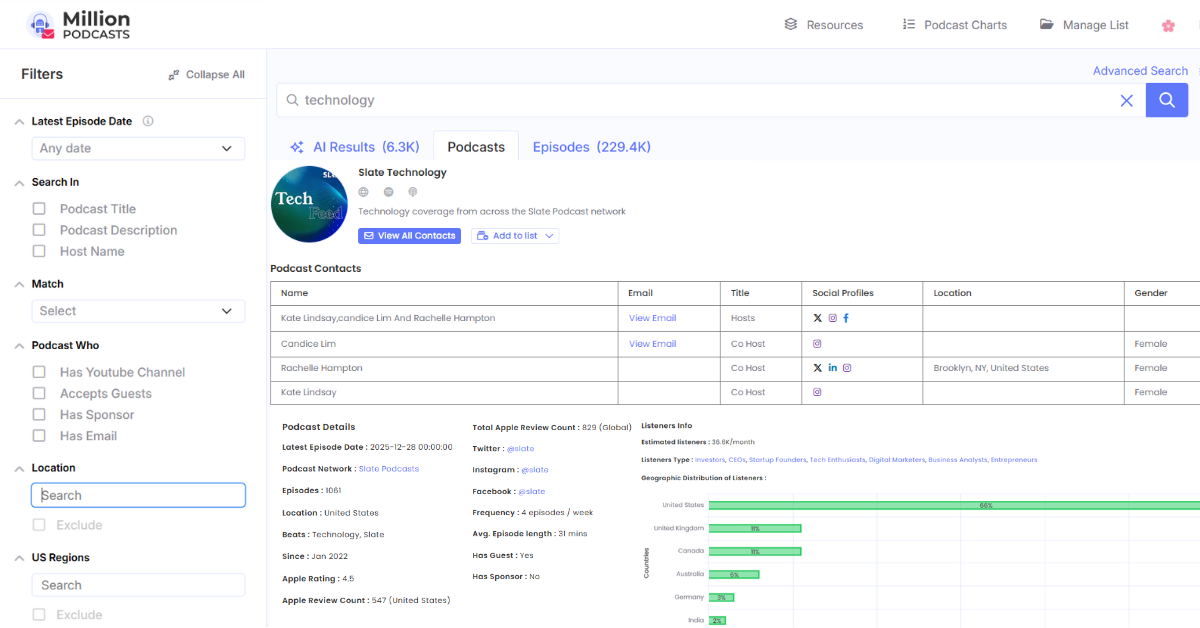
Everything you need to decide whether to pitch a show sits on one page, split into seven parts.
| Part of the profile | What it shows |
|---|---|
| Top of the page | Logo, name, description and links to the show's Website, Spotify, Apple Podcasts and YouTube |
| Podcast Contacts | Name, Email, Title, Social Profiles, Location and Gender for each host, co-host, producer or booker |
| Podcast Details | Last Episode Date, Episodes, Location, Beats, Since, Apple Rating, Apple Review Count (US), Total Apple Review Count (Global), Frequency, Avg Episode Length, Estimated Listeners, Language, Has Guests, Guests, Has Sponsors and Sponsors |
| Listeners Info | Listeners Type, Age, Income, Gender and Top Countries |
| Guests List | Guest Name, Profession, Occupation, Episode and Date, with its own export button |
| Sponsors List | Sponsor, Sponsored Episodes, Podcasts, Industry and Links, with its own export button |
| Episodes | Episode Number, Title, Description, Date, Duration and a player |
Pitch the Contact Whose Job Matches Your Ask
Write to the host about guest fit, the booker about dates and the producer about the episode angle.
Check Activity and Audience Before You Unlock
Unlocking reveals a contact's verified email and uses one unlock from your plan, so check the Last Episode Date, Has Guests and Listeners Info first. Listener details come with paid plans.
What Can You Export?
Any list you save downloads as a CSV or Excel spreadsheet, and you pick which of these 51 columns it includes.
| Group | Columns |
|---|---|
| Contact | Sr. No., First Name, Last Name, Designation, Email |
| Show | Podcast Title, Podcast Description, Website, Language, Podcast Network, Host Gender, Years Active, Episode Count, Episode Length (avg.), Latest Episode Date, RSS |
| Links | Apple Url, Spotify Url, Podcast YouTube Url, LinkedIn Url, Facebook Url, Instagram Url, Twitter Url |
| Reach | Apple Rating, Apple Review Count, Apple Review Count Country, Total Apple Review Count (Global), Monthly Estimated Listeners, Podcast YouTube Subscribers, Podcast Facebook Followers, Podcast Instagram Followers, Podcast Twitter Followers |
| Guests and sponsors | Has Guest, Has Sponsor, Guest Names, Number of Unique Sponsors, Sponsor Names |
| Location | Country, Region, City |
| Audience | Female Listeners, Male Listeners, Listeners other than Male and Female, Low income listeners, Medium income listeners, High income listeners, Gen Alpha listeners, Gen Z listeners, Millennials listeners, Gen X listeners, Baby Boomers listeners, Silent Generation listeners |
Every Paid Plan Allows as Many Exports as Unlocks
Exports and contact unlocks share the same limit on each paid plan, and the free plan doesn't include exports.
Guest and Sponsor Lists Export From Each Profile
A show's Guests List and Sponsors List each have their own export button, so you can download everyone who has appeared on or advertised with that show.
Pitches Go Out From Your Own Inbox
A CSV file opens in Excel, Google Sheets or any contact manager. You send each pitch from your own email, under your own name, so replies come straight to you.
Where Do the Contact Emails Come From?
Our researchers find them by hand on public pages, and none is marked verified until it passes a mailbox check. The sources are show websites, press pages and host bios.
Is MillionPodcasts Legit?
Yes, and you can check it yourself before paying anything.
Customers Review It Under Their Own Names
Our customers page lists reviewers with their real titles and firms.
- Podcasts without the media database slog: PR consultant Francesca De Franco says traditional media databases made it slow to single out podcasts. She found suitable shows far more simply in ours.
- A niche list her intern would have needed months for: Paulina Colwell, a PR account executive at KCSA Strategic Communications, needed coffee podcasts for a Best Coffee Cities study. She says gathering them by hand would have taken her team's intern months.
- Shows for nonprofit clients: Rochelle Brandvein, president of Brandvein-Aaranson Public Relations, used it to find podcast opportunities for her nonprofit clients.
Pricing Is Public and Payments Run Through Stripe
You can read every plan's price and limits on our pricing page before creating an account, then check out through Stripe.
You Can Test the Data on Shows You Know
On the free plan, search two shows you already know and compare their Last Episode Date, guest status and episode count with what you can confirm yourself. Checking their emails takes a paid plan, and a single month of Starter covers 25 unlocks.
What Are MillionPodcasts' Ranked Lists and Charts?
Ranked lists name the top shows in a single niche, such as fraud or banking podcasts, and Podcast Charts track the top shows on each platform.
Shows Are Ranked on Reviews, Ratings, Listeners and Activity
Each list ranks shows by Apple review count, Apple and Spotify ratings, monthly listeners, how actively they publish, subject expertise and authority within the niche, and every list page shows when it was last updated. You can browse every list in our podcast directory.
Each Listing Shows Who Runs the Show
A listing shows the hosts, the producer or network, a masked email, listener type, Apple rating and reviews, average episode length, and links to the show on Spotify, Apple Podcasts and YouTube. You can filter a list to shows with guests, sponsors or a YouTube channel, sort it, and export the full list with contacts from your account.
Podcast Charts Track the Top Shows on Each Platform
Podcast Charts list the top-ranked shows on Apple Podcasts, Spotify and YouTube by country and category, which is the fastest way to find established shows in a market.
Being Listed Puts Your Show in Front of Bookers and Sponsors
PR teams and brands browse these lists to find shows to pitch, so a listing with a current contact is where their guest requests and sponsorship offers reach you. Hosts often share their ranking with listeners too. For example, Tyfone announced that its Digital Banking Podcast made two of our 2026 banking lists.
To update the contact on your show's listing, email support@millionpodcasts.com from the show's own address with the show's name and the change you want.
How Much Does MillionPodcasts Cost?
You can start free with no card. Paid plans on our pricing page run from $11 to $149 a month billed yearly, or $19 to $249 billed monthly.
| Plan | Billed yearly, per month | Billed monthly | Unlocks and exports, yearly plan | Unlocks and exports, monthly plan | Searches a month | Results per search | Lists |
|---|---|---|---|---|---|---|---|
| Free | $0 | $0 | None | None | 100 | 20, or 5 with a filter | 3 |
| Starter | $11 | $19 | 1,500 a year | 25 a month | 100 | 250 | 3 |
| Pro | $29 | $49 | 12,000 a year | 500 a month | 250 | 1,000 | 10 |
| Business | $59 | $99 | 60,000 a year | 2,500 a month | 500 | 5,000 | 50 |
| Business Plus | $149 | $249 | Unlimited | 7,500 a month | Unlimited | Unlimited | Unlimited |
Prices and limits from our pricing page, checked October 27, 2026.
Each Plan Adds Contacts, Filters and Help
- Free: search, the core filters, show profiles and email support.
- Starter: verified host emails, producer and booker contacts, Twitter, LinkedIn and Instagram profiles, every filter including location and listener filters, listener geography, and CSV and Excel exports with the columns you choose.
- Pro: everything in Starter, plus AI Search and priority email support.
- Business: everything in Pro, plus a concierge service that researches contacts and builds lists for you over a Slack or Telegram channel.
- Business Plus: everything in Business, with no limit on unlocks, exports, lists, searches or results when billed yearly.
Yearly Billing Saves 40%
Yearly Starter costs $132 for the year with 1,500 unlocks, while 12 months of monthly Starter cost $228 for 300.
Which Plan Should You Choose?
Choose the smallest plan whose unlocks cover a year of pitching, and size monthly billing by your busiest month instead.
Starter Fits One Person Running a Few Campaigns
For example, four campaigns a year at 60 shows each, with two contacts per show, needs 480 unlocks, well inside Starter's 1,500 a year.
Pro Fits Teams Pitching Every Month
Pro's 12,000 unlocks a year average 1,000 a month, and it's the first plan with AI Search.
Business Fits Agencies With Several Clients
Business gives 60,000 unlocks a year and 50 lists, so each client can have its own, plus a team that researches contacts and builds lists on request.
Business Plus Fits Teams Pitching at High Volume
On yearly billing it's the only plan with no limit on unlocks, so the number of campaigns never decides what you can pitch.
Plan sizing calculator
Formula: unlocks a year equals campaigns a year times shows per campaign times contacts per show. Your busiest month assumes each campaign's unlocks happen in the month it runs, so it equals shows per campaign times contacts per show times the campaigns that share a month, which is campaigns a year divided by 12, rounded up. Yearly plans are matched on unlocks a year, and monthly plans on your busiest month. Limits from our pricing page, checked October 27, 2026.
How to Get Started Today
These nine steps take you from a new account to your first pitches.
- Create a free account: sign up on MillionPodcasts with no card needed.
- Search your topic: type it into the search bar and stay on the Podcasts tab.
- Keep only shows you can pitch now: set Latest Episode Date to Last 30 Days, then tick Accepts Guests and Has Email under Podcast Who.
- Narrow by fit: add the beat, language, audience size and listener filters your brief needs.
- Check each profile: confirm the last episode date, whether the show has guests, and who is listed as a contact.
- Save the shows that fit to a list: name it after the campaign, so the same show can sit in several campaigns without mix-ups.
- Pick a plan: size it with the plan sizing calculator, then upgrade.
- Unlock and export: unlock the contacts you'll pitch and export the list to CSV or Excel with the columns you need.
- Send your pitches: send them from your own email or contact manager, under your own name.
Questions along the way go to our Help Center or to support@millionpodcasts.com.
Start free, no card needed.
Search 3.1 million podcasts and open any show's profile today.
Create your free account →